
Platform
macOS 14+
SwiftUI, native window
Runs entirely on your Mac. Deterministic. Yours to keep.
Paste a JWT, a hash, or a blob of JSON, and the right tool is already open.
macOS 14+ · Apple silicon & Intel · native Swift 6 / SwiftUI

The stuff you keep re‑Googling at 2am, grouped the way you think about it. Plus the dozen‑plus everyday utilities you already reach for.
Showing all 17 tools.
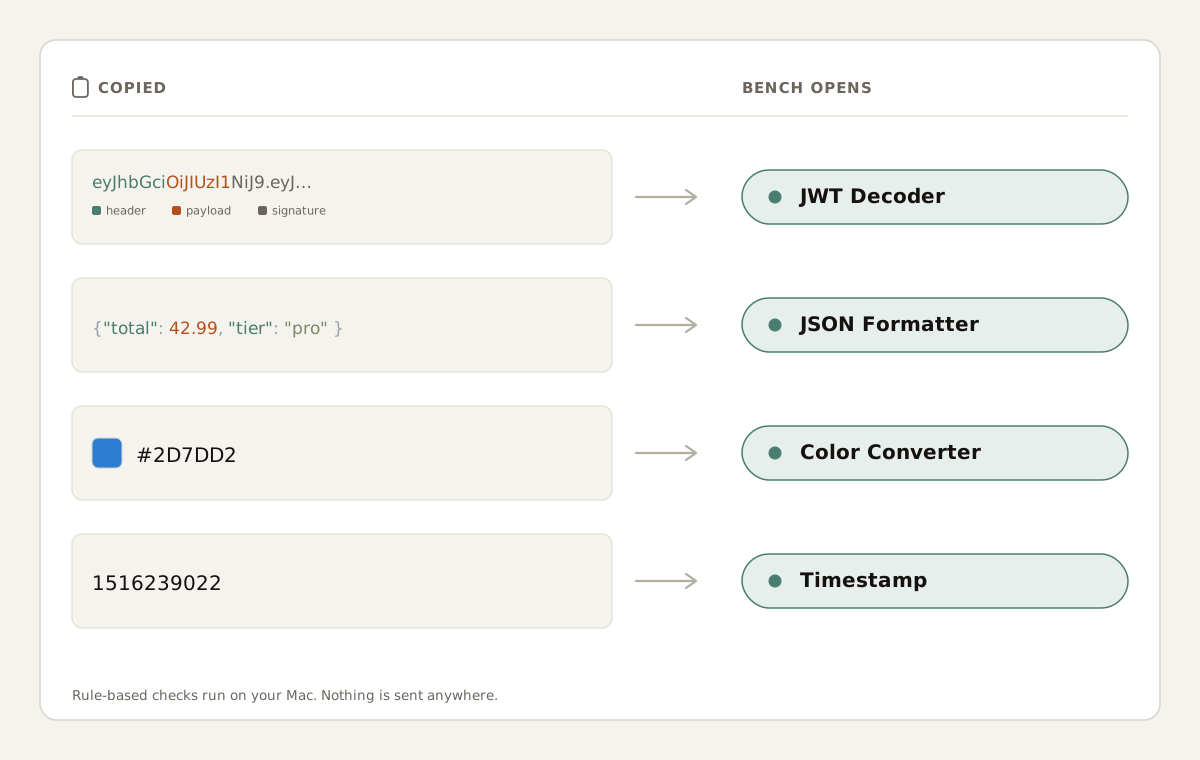
A small rule-based check reads your clipboard and picks a tool. It runs on your Mac, so your clipboard stays with you.
{
  "order_id": "8f3b",
  "items": [
    {
      "sku": "BNCH-001",
      "qty": 2,
      "price": 19.99
    },
    {
      "sku": "BNCH-PRO",
      "qty": 1,
      "price": 14.99
    }
  ],
  "customer": {
    "id": 9001,
    "tier": "pro"
  },
  "total": 42.99
}Copy a chunk of JSON, switch to Bench, and the formatter is waiting. Copy a hex color, and the converter is open. Copy a JWT, and it's already decoded. Nothing to click.
The detection is regex and string checks. Maybe 200 lines. It's a rule‑based heuristic that runs entirely on your Mac. If it doesn't recognize what you pasted it just gives up quietly and lets you pick.
# bench.manifest: what Bench does, and doesn't

network.client        : false    # sandbox entitlement
analytics             : none
telemetry             : none
account.required      : false
third_party.sdks      : []
detection.method      : rule_based_heuristic
data.leaves_device    : false
purchase.model        : one_time
subscription          : none
Most regex tools stop at green highlights. Bench parses your pattern into a labeled tree, so the explanation and the match come from the same hand‑built engine.
Bench parses your pattern into a labeled tree so you can see what each group, quantifier, and class actually does. Matches highlight inline as you type, and you can step through the execution trace one move at a time.
It runs on a hand‑built engine, so the explanation and the match are computed together on your Mac as you type. If you have ever inherited a regex you were afraid to touch, this is the tool that makes it legible.
Hover any token for a plain‑English explanation of what it matches and why it's there.
Step the NFA trace to see exactly why a match did (or didn't) happen, one move at a time.
JSON and JWT are the tools Bench recognizes the moment you copy them. Image Diff is the visual check that's awkward to do anywhere else.
Paste minified JSON, get it back indented and readable. Bench detects it the moment you copy it, so the formatted output is waiting before you ask. Spot the missing comma before you ship.
Decode a token into its header, claims, and signature on your Mac. Copy a JWT, switch to Bench, and read it. The token stays on your machine, so credentials you control stay under your control.
Drop in two versions of a screenshot or asset and see exactly what changed: pixel differences surfaced side by side. The visual check that's awkward to do anywhere else.
Plus a dozen more everyday utilities (Base64, URL and text‑case encoders, hashes, timestamp, color, and number‑base converters, Markdown preview, and text diff), each detected and routed the same way.


Requires macOS 14 or later · Apple silicon or Intel · Universal binary
Bench is free on the Mac App Store. Core tools are included; Bench Pro is an optional one-time unlock for Smart Detection, Pro tools, and higher limits.
Prices in USD. The App Store shows the final Pro unlock price for your region.
Bench is free on the Mac App Store. Bench Pro is $14.99 as a one-time unlock.
Free to download. Bench Pro is an optional $14.99 one-time unlock for Smart Detection, Pro tools, and higher input limits.
If yours isn't here, email [email protected]. Every message is read by a human.
Yes. Every tool runs entirely on your Mac. No tool in Bench makes network calls. The exceptions are Apple's App Store download and Pro purchase/restore flows, which are handled by macOS itself and use the network to talk to Apple, not to us.
No. It's rule‑based pattern matching: regex and string checks tuned per format, with no model involved. That's why it's instant and deterministic, and the work happens entirely on your Mac.
Bench is free to download. Bench Pro is an optional $14.99 one-time in-app purchase that unlocks Smart Detection, Pro tools, and higher input limits.
No. Bench keeps everything local on the Mac you're using. There are no accounts, no servers to sign into, and nothing is sent anywhere for you to sync against. If you want your recent inputs on another Mac, copy and paste them.
Yes. Bench ships as a universal binary that runs natively on Apple silicon and Intel Macs. The minimum system requirement is macOS 14.
None. Bench has no account system and carries no analytics or third‑party SDKs. Smart Paste reads your clipboard locally to pick a tool; the detection is a rule‑based heuristic that runs on your device. Whatever you type, paste, or generate stays on your Mac.
Bench updates arrive through Apple the same way as any Mac app you install from the store. You don't need to do anything special; macOS handles the install when an update is available.
Purchases and refunds are handled by Apple. You can request a refund from Apple directly via reportaproblem.apple.com. If something in the app isn't behaving, email [email protected] first. There's a good chance it's a fixable bug.